
In short
Red dots with these footprints go straight on the CZ Duty slide. You need no adapter plate - the pins that come in the box with the pistol are enough:
- Red dots with Trijicon RMR footprint
- Red dots with Shield RMSc footprint
- Red dots with Holosun K-series footprint
- Red dots with Leupold DPP footprint
Which red dot? On a full-size pistol like the CZ Duty 4.0 F, we see no problem with a larger red dot and a big window. On the compact CZ Duty 4.0 C, we would rather pick a smaller one, so the red dot stays in proportion to the pistol. That is why our picks for the F are red dots with the Trijicon RMR footprint, and for the C red dots with the Shield RMSc footprint. A large red dot still fits the C - the pins make that possible.

Footprints and pins for the CZ Duty
The slide of the CZ Duty has one cut for many footprints. What changes is the set of pins you put in. Find your footprint and you know which pins to use.
| Footprint | Pins from the box | Screw thread in the slide | Plate needed |
|---|---|---|---|
| Trijicon RMR footprint | Set 1 | 6-32 UNC | No |
| Shield RMSc footprint | Set 3 + 2 pins B | M4 | No |
| Holosun K-series footprint | Set 3 | M4 | No |
| Leupold DPP footprint | Set 2 + 2 pins A | M4 | No |
| Holosun 509T footprint | Set 4 + 1 pin B | M4 | Yes, 509T plate |
| Aimpoint Acro footprint (Acro P-2) | Set 2 + 2 pins B | M4 | Yes, Acro P-2 plate |
The screws always come with your red dot, not with the pistol. Not sure which footprint your red dot has? Check red dots by footprint.
Mounting a red dot on the CZ Duty, step by step
Here is the CZ Duty manual in short. All you need is a T20 Torx screwdriver and the pins from the box.
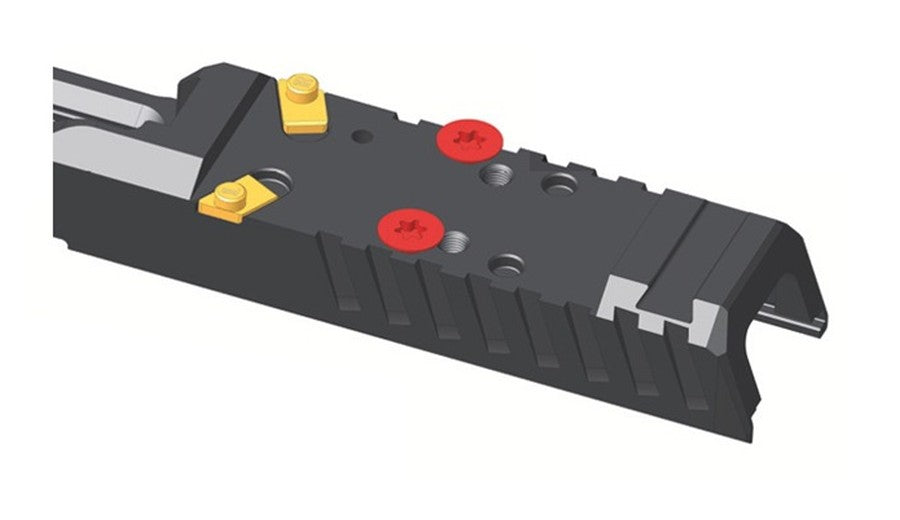
Trijicon RMR footprint: pin set 1
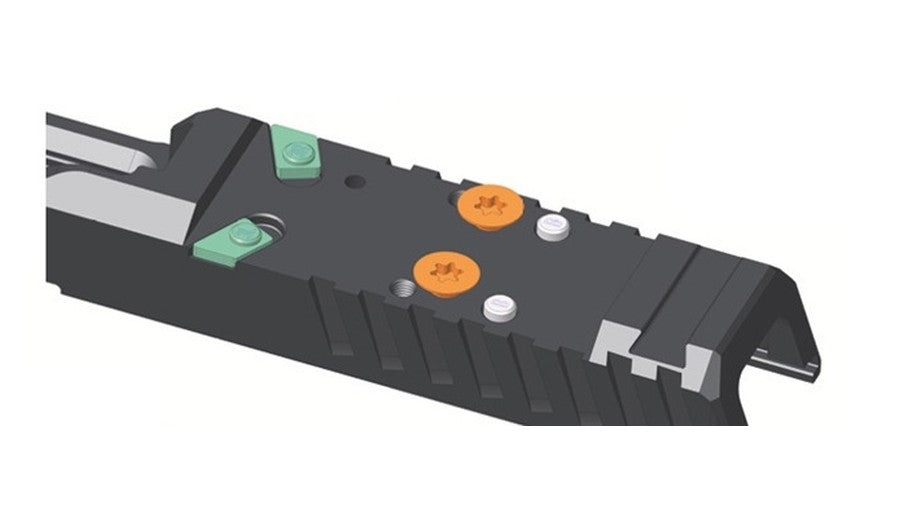
Shield RMSc footprint: pin set 3 and two pins B
- Take off the cover. Undo the screws of the cover on the slide with the T20 Torx and lift the cover off.
- Pick your pins. Use the table above to find the pin set for your red dot.
- Put the pins in. The front pins have a flat base and slide into the groove. The round pins (A or B in the table) go into a hole.
- Check the screws. Put the screws through your red dot. If a screw sticks out more than 4 mm under the red dot, shorten it or use a shorter one. A screw that is too long can stop the pistol from working and will not hold the red dot well.
- Set the red dot on the pins. The screw holes in the red dot must line up with the holes in the slide.
- Tighten the screws. Follow the red dot maker's instructions. CZ recommends 2 to 2.8 Nm. You can add a thread locker such as Loctite 243.
CZ Duty 4.0 F: a larger red dot
The F has the full-size grip and plenty of room on top. Here a larger red dot with a big window makes sense - you find the dot faster. Our three picks are the red dots with the Trijicon RMR footprint that our customers order most.
Every RMR red dot in one place
Every red dot with the Trijicon RMR footprint fits your CZ Duty F with pin set 1. CZ Parts keeps them in one collection.


CZ Duty 4.0 C: a smaller red dot
The C has the compact grip, so the whole pistol is smaller. A smaller, slimmer red dot matches its size better. Our three picks are the red dots with the Shield RMSc footprint that our customers order most.
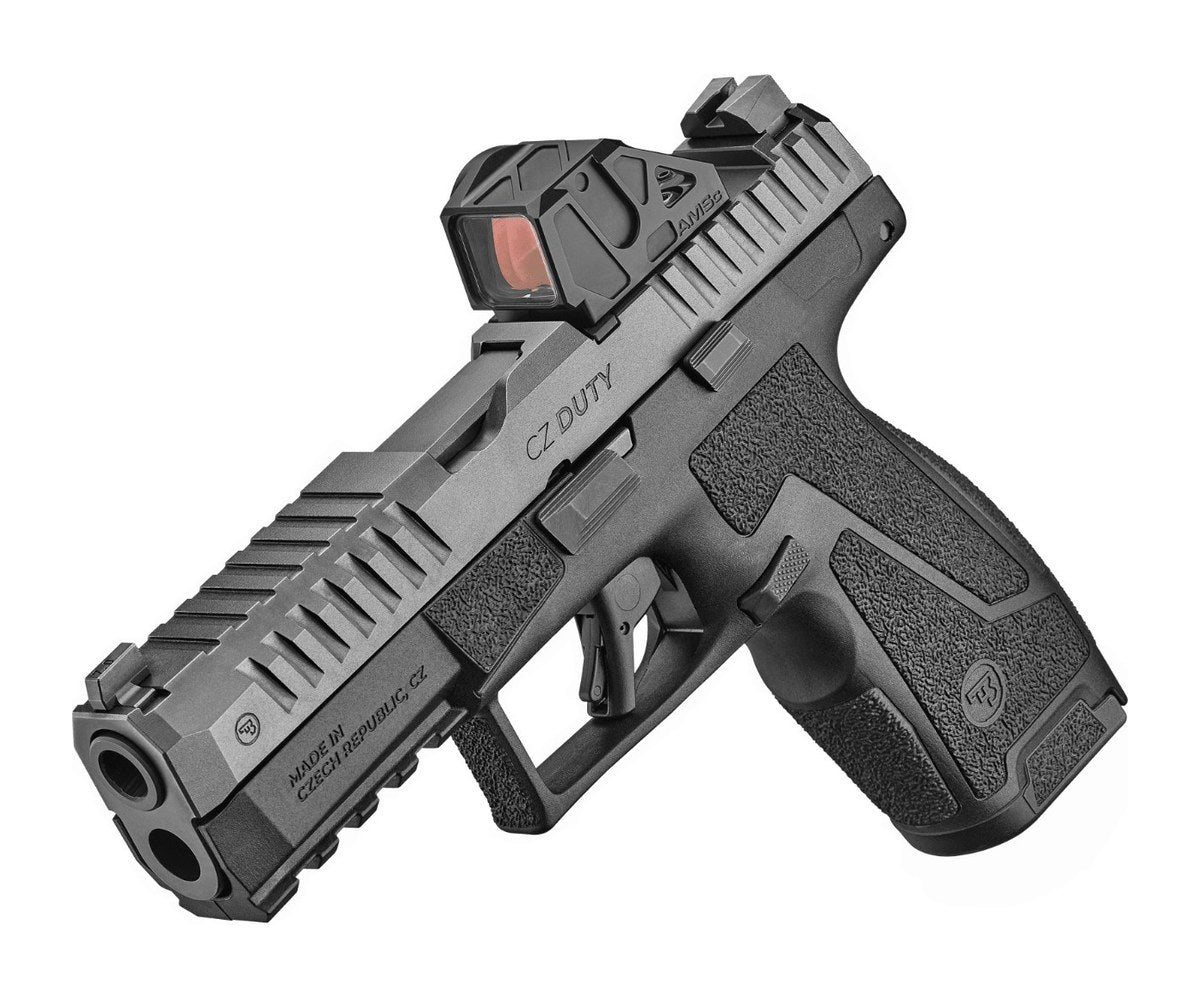
Small red dots for the CZ Duty C
Every red dot with the Shield RMSc footprint at CZ Parts fits the C with pin set 3.


More about footprints and plates on other CZ models is in our compatibility guide.
Got a CZ Duty and a red dot you are not sure about? Send us the model name and we will check the footprint for you.